Ana Sayfa / Kod ve Scriptler / FlatCMS For Static Websites
FlatCMS For Static Websites
FLATCMS – Mevcut statik bir web sitesini birkaç dakika içinde bir CMS içerik yönetim sistemine dönüştürün
- Yayın tarihi6 Mayıs 2021
- Nerede çalışırPHP 7.0, PHP 7.1, PHP 7.2, PHP 7.3, PHP 7.4, PHP 8.0, PHP 8.1, PHP 8.2, PHP 5.6
- Paket içeriği.php, .css, .html, JavaScript .js
- Son güncelleme15 Aralık 2023
- Canlı demoVar

Overview
Turn any existing static website into a CMS content management system in a few minutes. Edit, upload, resize and manage images and files.
FLATCMS can be used on a desktop, tablet or smartphone. Works with language files ( currently available English, Spanish, Italian, German and Dutch ). Create in minutes a cms for a client with static html files.
Features
Uses Bootstrap, Optimal security (with brute force protection), xHTML valid sourcecode and the latest TinyMCE 5. PHP 8 ready
Explanation
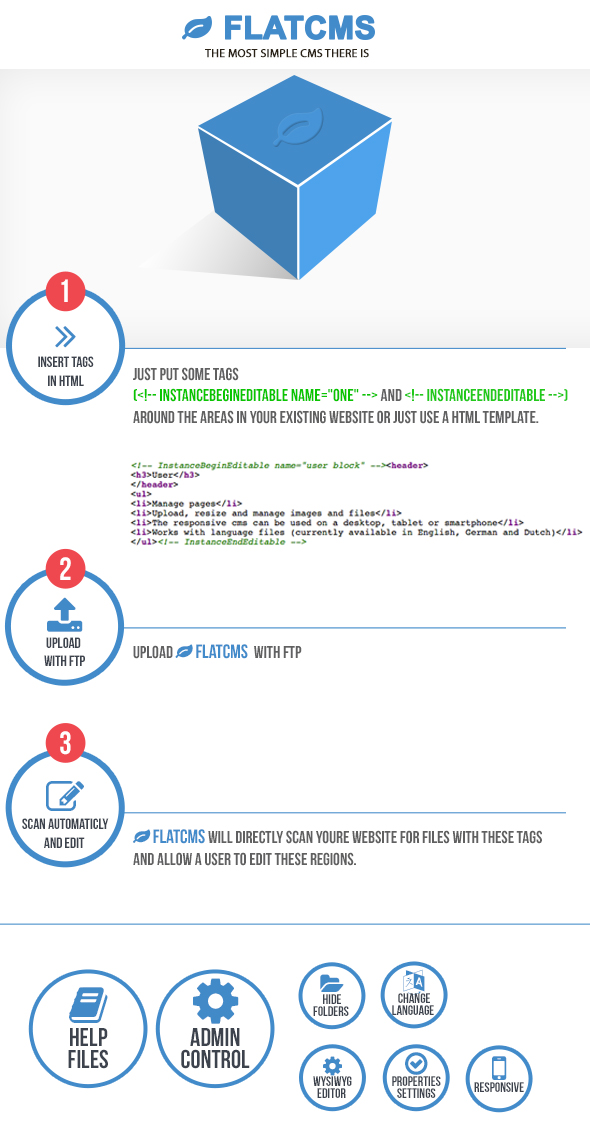
FLATCMS is one of the most simple Content Management System (CMS) there is. With FLATCMS the owner of a website can easily edit the content. This doesn’t require any knowlegde about websites or HTML.You can install FLATCMS in any existing website or just use a html template. You provide the HTML-files with some editable region tags. FLATCMS will then know which parts it’s allowed to edit. It doesn’t matter if you made the HTML-files yourself or if they’re made by software like Dreamweaver, Frontpage, Studio Webdesign, WebCreator etc. As an Administrator you have your own login code. This allows you to easily change the configuration, like hiding certain folders, switch on/off buttons for various properties settings in the (WYSIWYG) Editor or changing the language and set the login code for a user.
Demo
You can login here to see a demo of FLATCMS. Because this is a demo none of the changes will be saved. For the admin login you can use (name) admin – (pass) 1 or as user (name) user – (pass) 1
Support
I will NOT give support to free hosting services or a local host setup since I cannot solve then any path problems if they occur.
Requirements
- php
- webhosting
Benzer ürünler

CMS ile PHP 8 kurumsal web sitesi; ana sayfa bannerları, dinamik blog, katalog ürünleri, kariyer başvurusu ve duyarlı tasarım.
Yayın: Ağustos 2026
Bağımsız Laravel 13 CMS — CRUD üreteci, eklenti sistemi, temalar, ACL, çok dilli. Tam kaynak. Ömür boyu güncellemeler.
Yayın: Temmuz 2026
Bağımsız Laravel portföy ve özgeçmiş CMS'i — 3 ana sayfa, projeler, referanslar. Botble çekirdeği dahil. Ömür boyu güncellemeler.
Yayın: Temmuz 2026
Bağımsız Laravel çok amaçlı iş ve girişim CMS'i — 5 ana sayfa, Bootstrap 5. Botble çekirdeği dahil. Ömür boyu güncellemeler.
Yayın: Temmuz 2026
Bağımsız Laravel ajans ve portföy CMS'i — 5 ana sayfa, animasyonlar, koyu mod, e-ticaret. Botble çekirdeği dahil. Ömür boyu güncel
Yayın: Temmuz 2026
Her hizmet işletmesi için evrensel PHP web sitesi ve CMS. Görsel randevu takvimi, fotoğraf galerisi ve müşteri hesapları. Veritabanı yok.
Yayın: Mayıs 2026