Ana Sayfa / Kod ve Scriptler / MenuMate - The QR Code Menu Ordering System
MenuMate - The QR Code Menu Ordering System
MenuMate, çeşitli ürün ve hizmetler için sipariş verilebilen bir web sistemidir.
- Yayın tarihi17 Nisan 2023
- Paket içeriği.php, .css, .html, JavaScript .js
- Son güncelleme17 Nisan 2023
- Canlı demoVar

Overview
MenuMate The QR Code Menu Ordering System is an innovative web tool that allows customers to easily order food and beverages by scanning QR codes placed on tables. The system is designed for use in restaurants, bars, cafeterias, hotels, and many other industries where customers need to order food and drinks.
This system is made using the latest Laravel version so that it can be accessed on various types of devices such as smartphones, tablets and computers.


Features
MenuMate has a variety of features that make the ordering process easy. The following are excellent features possessed by MenuMate:
Web
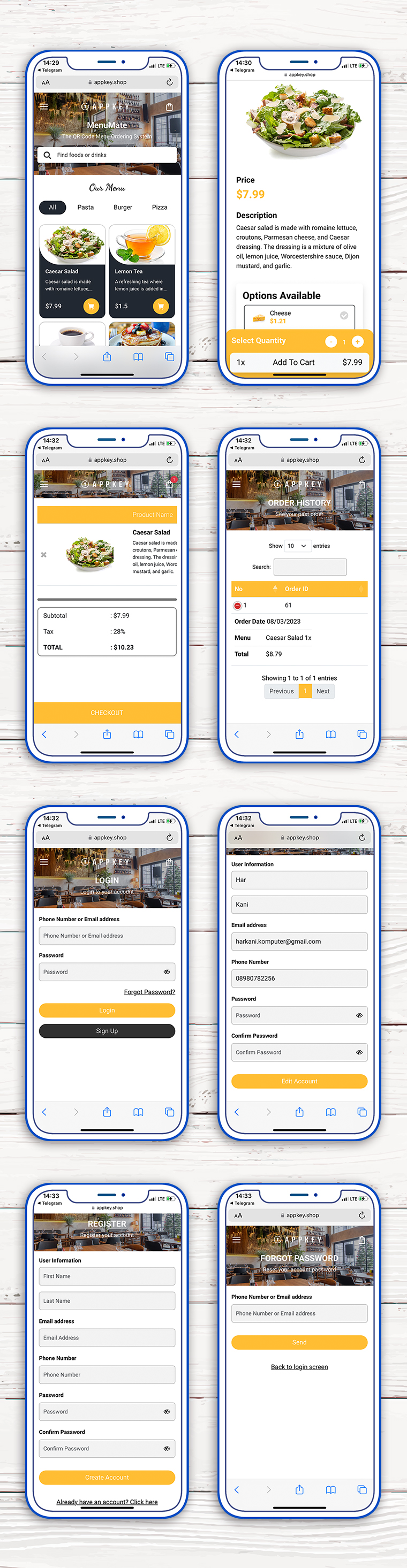
QR Code Scan : Customers can scan the QR Code provided at each table before entering MenuMate. After successfully scanning the customer, they will be directed to the product page. QR code can be easily generated through the admin panel.
Register : In order to store order data, customers can register on MenuMate, which can be easily done by the customer.
Forgot a Password : This feature will later help customers who have difficulty logging into the system because they forgot their password. Customers can request a new password by simply filling in an email that has been previously registered.
Menu View : The menu has a modern and minimalist design appearance. Customers can easily understand the information on the menu. We have also arranged so that the menu can appear properly on various types of devices such as smartphones and tablets.
Detail Menu : The detail page displays information about the products being sold, including images, titles, and descriptions. With its modern and simple design, customers can easily understand the information presented on this page.
Optional Product : The product detail page also provides a wide selection of products that customers can choose from.
Shopping Cart : After customers have finished selecting the product they want to order, they can immediately add it to the basket. On this page customers can add the number of products they want to order or cancel.
Order History : Customers can view their order history through the shopping history feature on the website, which displays previously ordered items. This feature provides a complete recap of all orders, including the name of the item, quantity, price, date, and any applied discounts.
Admin
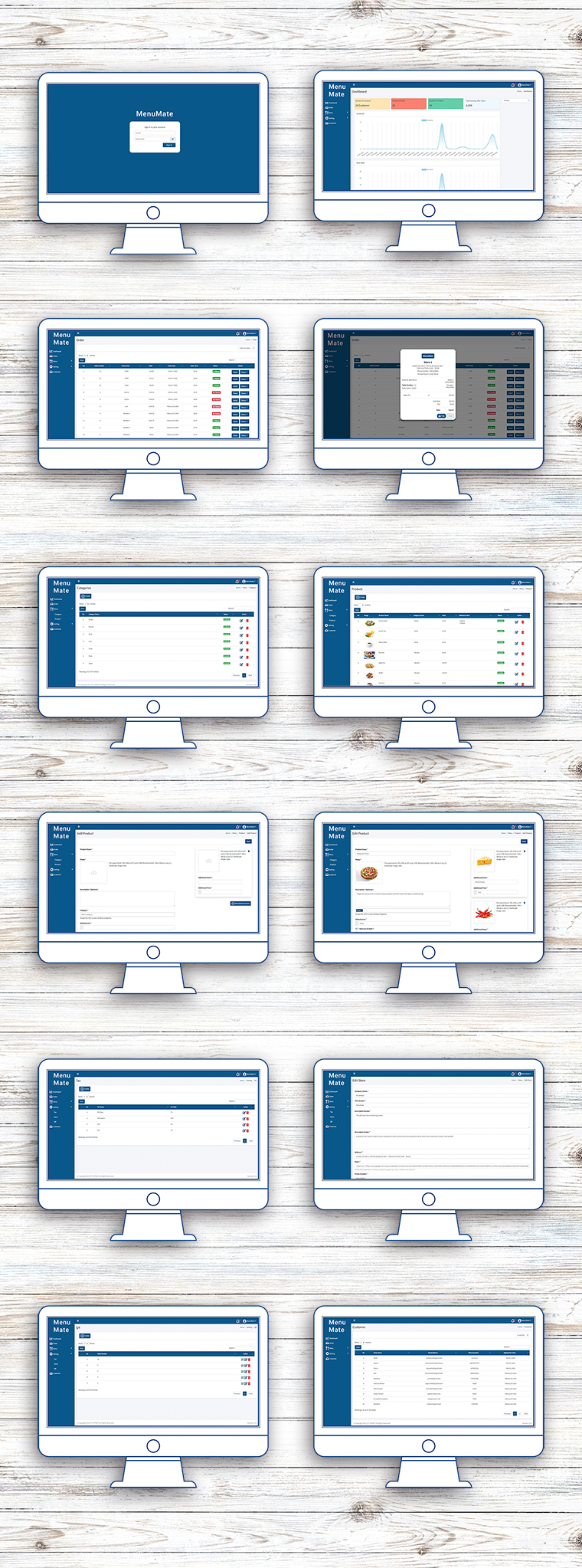
Orders management : Admins can easily manage every order data that enters the system, such as viewing order details, changing order status and printing order data.
Product category : You can add different categories to group the types of products you sell. You can also activate and deactivate each category according to your needs.
Management products : Admin can add products on this page. Complete product data such as name, description, image or optional product that you want to display on the website.
Tax : Add tax data on this page such as name and what percentage of additional tax costs will be incurred by the customer.
Store Information : You can easily update store data on this page, data such as logos, store names, descriptions etc. can be easily managed by you.
QR Code Management : You can add a QR Code to each table on this page. Just enter the table name, the QR Code is ready to be placed and scanned by the customer.
Customer Management : Every customer who registers on the website will record all their data on this page. You will be able to see how many customers have registered.
Web and Admin Panel Demo
Web MenuMate
Admin Panel
| Market Site | https://market.appkey.dev/ |
| Landing page MenuMate | https://market.appkey.dev/menu-web/ |
| Support page | https://appkey.shop/support/login |
| Documentation | <a rel="nofollow" href="ht |
Requirements
- PHP >= 8.0
- Ctype PHP Extension
- cURL PHP Extension
- DOM PHP Extension
- Fileinfo PHP Extension
- Filter PHP Extension
- Hash PHP Extension
- Mbstring PHP Extension
- OpenSSL PHP Extension
- PCRE PHP Extension
- PDO PHP Extension
- Session PHP Extension
- Tokenizer PHP Extension
- XML PHP Extension
Benzer ürünler

Laravel web sitesi, kurye uygulaması ve yönetici paneliyle restoran siparişlerini, teslimatları, canlı takibi ve masa rezervasyonlarını yönetin.
Yayın: Ekim 2026
Pasta gezintisi, kullanıcı hesapları ve çevrimiçi sipariş için duyarlı bir web uygulaması.
Yayın: Temmuz 2026
QR garanti yönetimi, müşteri portalı ve REST API içeren Laravel e-ticaret CMS'i
Yayın: Temmuz 2026
IonKart ile hiperyerel talep üzerine bir iş başlatın! Operasyon bölgelerinde mağazaları, teslimatı ve siparişleri sorunsuz yönetin.
Yayın: Ocak 2025
StarCart - Ecommerce Çevrimiçi Sipariş Sistemi (her tür e-ticaret işine uygun)
Yayın: Ocak 2021
React vitrin, Laravel yönetici paneli, kuponlar, sipariş takibi ve kapıda ödeme ile bir moda mağazası işletin.
Yayın: Kasım 2026