Ana Sayfa / Eklentiler / MailPilot - Email Marketing for WordPress
MailPilot - Email Marketing for WordPress
WordPress'teki e-posta kampanyalarını, rıza öncelikli kişileri ve otomasyonları sürükleyip bırakın. Kendi e-posta sağlayıcınızı ve yapay zekanızı getirin.
- Yayın tarihi24 Ekim 2026
- Nerede çalışırWordPress 6.6, WordPress 6.7, WordPress 6.8, WordPress 6.9, WordPress 7.0, WordPress 7.1, WooCommerce 10.x, WooCommerce 11.x
- Paket içeriği.php, .css, .html, JavaScript .js
- Son güncelleme24 Ekim 2026
- Canlı demoVar


Overview
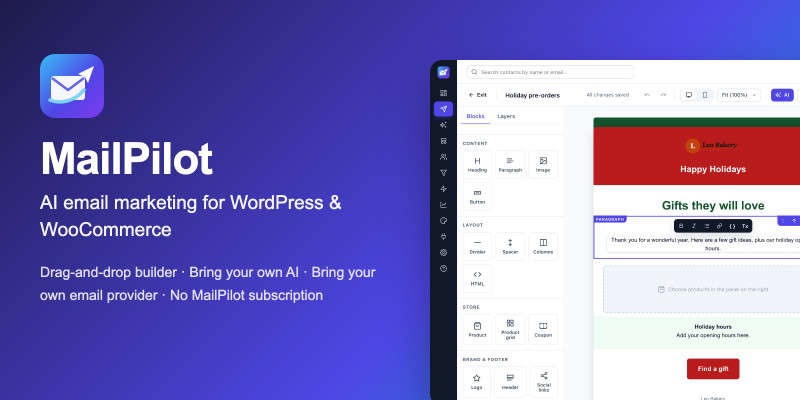
MailPilot is an email marketing plugin that runs inside your WordPress site. Design campaigns with a drag-and-drop builder or, optionally, your own AI account, send them through the email service you already use, and keep your subscribers in your own database. There is no MailPilot subscription: you pay your email and AI providers directly under their own terms.
Try the live demo
The demo opens with one click and needs no password. It belongs to a fictional bakery with fictional subscribers and resets every night. No email is sent from the demo: its only email provider discards every message, and AI Email Studio shows pre-written example output.
Bring your own email provider
Built to each provider's documented API: SMTP, Amazon SES, SendGrid, Mailgun, Brevo, Postmark, Resend, MailerSend, SparkPost, Mailjet, SendPulse and Elastic Email. Delivery events, bounces and complaints come back through signed webhooks where the provider supports them.
Bring your own AI (optional)
Built to each provider's documented API: OpenAI, Anthropic Claude, Google Gemini, OpenRouter, DeepSeek, Groq, Mistral, xAI Grok, Ollama, or any OpenAI-compatible endpoint. AI Email Studio turns a short description into an editable design using your Brand Kit and the WooCommerce products you pick. It never invents prices, products or coupons, and your contacts are never sent to the AI provider.
Good to know
- A plan for transactional email (receipts) may not allow newsletters. Check your provider's terms before sending campaigns.
- Open rates are approximate because of privacy features in email apps.
- MailPilot helps with CAN-SPAM, GDPR and CASL, but cannot guarantee legal compliance or inbox placement.
- SMTP connections cannot report bounces or complaints back to MailPilot.
- Not included in 1.0: abandoned-cart emails, translations of the admin screens (PHP strings are translatable), WordPress multisite.
Privacy and security
- Subscriber data stays in your WordPress database. There is no MailPilot-hosted service and no telemetry.
- Contacts go only to the email provider you connect, and only to send their emails. Only email content, your Brand Kit and the products you choose are sent to your AI provider.
- API keys and SMTP passwords are encrypted in the database and never shown again after saving. Only users with the Manage permission can change connections.
- Unsubscribe links are signed. Tracking can be turned off per campaign or site-wide.
- Personal data export and erasure work through WordPress's built-in privacy tools.
License
The plugin code is GPL-3.0-or-later (it includes Action Scheduler, GPL-3.0-or-later). The marketplace license covers the package, documentation, updates and support. Details are in Licensing/LICENSE.txt in the download.
Screenshots and the demo use fictional data (Leo Bakery, example.com addresses). The AI Studio screenshot shows example output.
Features
- Drag-and-drop email builder: 16 blocks, 12 starter templates, desktop and mobile preview, plain-text version, undo/redo and version history. Table-based HTML with Outlook button and column fallbacks and dark-mode styles.
- AI Email Studio (optional): describe an email and get an editable design in your brand colours, plus subject lines, preheaders, rewrites, translations and a content review.
- Consent-first contacts: CSV and Excel import that asks how people opted in, double opt-in, suppression list, one-click unsubscribe, preferences page and consent history.
- Segments: tags, lists, engagement, custom fields and WooCommerce purchases, with live counts.
- Safe sending: background queue, provider rate limits, automatic retries for temporary errors, pause and resume. Every recipient is re-checked for unsubscribes and suppressions right before sending. Approval is tied to the exact content and audience reviewed. Provider timeouts are marked "uncertain" and never resent automatically.
- Automations: welcome series, birthdays, post-purchase follow-ups and tag-triggered emails.
- WooCommerce (optional): product cards from your catalogue, coupon blocks, purchase-based segments and checkout opt-in. Compatible with HPOS.
- Reports and analytics: deliveries, clicks, approximate opens, bounces, complaints, unsubscribes, subscriber growth, campaign comparison and CSV export.
- Brand Kit: logo, colours, tone and footer details applied to every template.
- Accessible admin: light and dark mode, keyboard support, checked against WCAG 2.2 AA with automated tests, works on tablets and phones.
- Diagnostics: system checks and a safe mode that works even if the app cannot load.
Requirements
- WordPress 6.6 or later (single site)
- PHP 8.1 to 8.4 with the sodium and cURL extensions
- MySQL 8.0+ or MariaDB 10.6+
- An account with an email delivery provider whose plan allows marketing email
- Optional: WooCommerce 10.9+ and an AI provider account
- A server cron job is recommended above a few hundred contacts
Instructions
- In WordPress go to Plugins, Add New, Upload Plugin, choose
mailpilot.zipfrom the download, then Install and Activate. - Optional but recommended: add
define( 'MAILPILOT_ENCRYPTION_KEY', '...64 hex characters...' );to wp-config.php. - Follow the setup wizard: business details, sending provider, test email, optional AI provider, first campaign.
The full guide is in Documentation/index.html (also as a PDF) inside the download.
Benzer ürünler

Kendi sunucunuzda barındırılan WordPress e-posta bülteni eklentisi. HTML kampanyaları aylık ücret olmadan oluşturun, gönderin ve yönetin.
Yayın: Şubat 2026
Sendy ile e-posta kampanyaları için WordPress yazılarını otomatik olarak Sendy'e gönderin
Yayın: Nisan 2024
Güzel, ikonsuz bülten modalı WordPress için. Kit (ConvertKit) V4 API ile entegre olur. Tamamen duyarlı ve kolay yapılandırılabilir
Yayın: Nisan 2026
Sınırsız abone toplama özelliğiyle e-posta listenizi katlanarak büyütün. Kitlenizi cezbedecek ilgi çekici bültenler gönderin
Yayın: Haziran 2023
Bu eklentiyle güzel çekilişler oluşturabilir ve ziyaretçilerinize ödüller sunabilirsiniz.
Yayın: Kasım 2016
WordPress için bülten abonelik eklentisi (opt-in). Posta listenizi bugün büyütmeye başlayın.
Yayın: Nisan 2016