Ana Sayfa / Eklentiler / Lobo Admin Pro - WordPress Dashboard Customizer
Lobo Admin Pro - WordPress Dashboard Customizer
WordPress kontrol paneline ve giriş ekranına temiz bir görünüm, logonuz ve renkleriniz verin ve her rol için menüleri gizleyin.
- Yayın tarihi26 Ekim 2026
- Nerede çalışırWordPress 7.1
- Paket içeriği.php, .css, .html, JavaScript .js
- Son güncelleme17 Kasım 2026
- Canlı demoVar


Overview
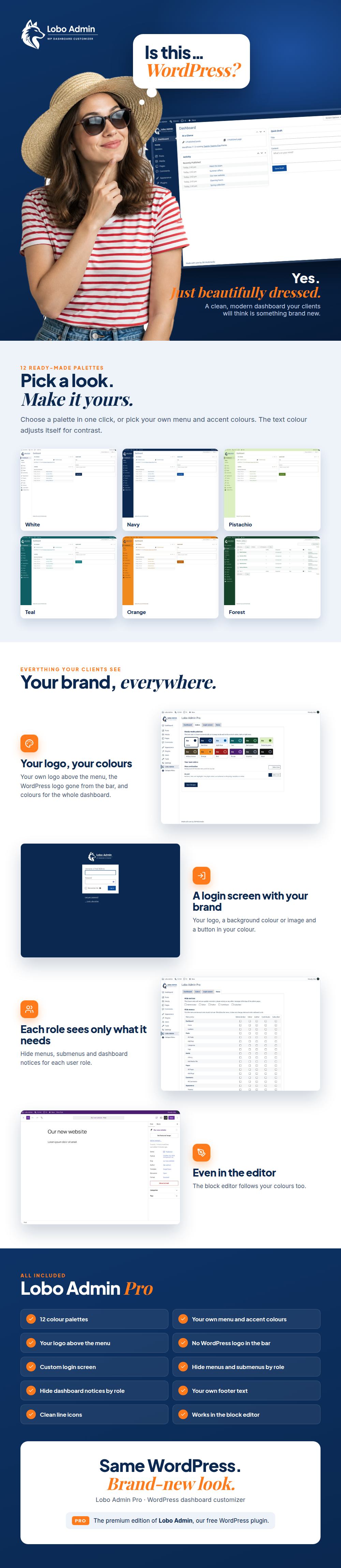
Lobo Admin Pro turns the WordPress dashboard into a clean, branded workspace for you and your clients.
Choose one of the 12 color palettes or set your own menu and accent colors: the text switches between white and dark automatically so it is always readable. Put your logo above the admin menu, remove the WordPress logo from the toolbar and write your own footer text.
The login screen gets the same care: your logo, its width, a background color or image, and the button color.
For client sites, the Roles tab lets you hide admin notices and any menu or submenu for each user role, so every user sees only what they need. It only hides items: it never changes user permissions.
Everything is set from one settings page with tabs, with no code.
Features
- 12 ready-made color palettes
- Custom menu, toolbar and accent colors with automatic text contrast
- Your own logo above the admin menu, with an automatic white version for dark menus
- Remove the WordPress logo from the toolbar
- Custom footer text in the dashboard
- Login screen: logo, logo width, background color or image, button color
- Hide admin notices by user role
- Hide any menu or submenu by user role
- Works with the block editor
- Translation ready
Requirements
- WordPress 6.5 or higher
- PHP 7.4 or higher
Instructions
- In your dashboard, go to Plugins > Add New > Upload Plugin.
- Choose the lobo-admin-pro.zip file and click Install Now.
- Activate the plugin.
- Open Lobo Admin in the admin menu and set your palette, logo, login screen and roles.
- Save the changes. Your settings are kept if you deactivate the plugin.
Benzer ürünler

Beyaz etiketli wp-admin teması: çekirdek ekranlarda gerçek karanlık mod, cesur açık/koyu tasarım, giriş ve altbilgi markalaması.
Yayın: Ağustos 2026
WordPress başlığınıza en fazla 3 özelleştirilebilir bağlantı ekleyin. Tam renk ve arka plan desteğiyle duyarlı tasarım
Yayın: Ekim 2024
WordPress girişinizi güzelleştirir ve optimize eder. Gereksiz seçeneklere veda edin, kullanıcı dostu bir deneyime merhaba deyin.
Yayın: Ağustos 2024
WordPress yönetim panelinizi sadeleştirir ve optimize eder. Gereksiz seçeneklere veda edin, kullanıcı dostu bir deneyime merhaba deyin
Yayın: Ağustos 2024
YOP-FAQ; WordPress SSS'lerini akordeon düzenleri, canlı arama, SEO araçları, analizler ve editör entegrasyonlarıyla yönetir.
Yayın: Kasım 2026
Seviye atlamaları, rozetleri, tamamlanan kursları ve ilk siparişleri trompet, konfeti ve tantana eşliğinde tam ekran bir partiye dönüştürün.
Yayın: Kasım 2026